







SAN CLEMENTE, CA, USA: world-class sound collections developer/licensor Q Up Arts is proud to continue trying to make a positive difference during the turbulent year that is 2020 by pledging 50% of the sales of California KeysTM — making musical waves upon release as a cutting-edge KONTAKT PLAYER sample instrument for professional keyboardists and composers, centered around a Fazioli 10- foot grand piano presented in stereo and surround — to GlobalGiving’s California Wildfire Relief Fund (https://www.globalgiving.org/projects/california-wildfire-relief-fund/), as of October 2…

Slashing pricing from $499.00 USD to $150.00 USD, then giving away 50% of the remaining revenue might appear a reckless business decision, but that is exactly what world-class sound collections developer/licensor Q Up Arts is proudly doing with its iconic California Keys software title. This gesture follows hot on the heels of the COVID-19 free sound giveaway generously offered in April of this year. Yet Q Up Arts President Douglas Morton makes his position perfectly clear when reflecting upon this — some might say — surprising move. “Witnessing how fire is consuming California, a state already heroically battling COVID-19 and the economic slowdown, is heartbreaking,” he says, somewhat sadly.
Such sadness is all the more appreciable as the iconic Californian music tech brand co-founder grew up in Cupertino and still lives in California. Sadly, some of the verdant parks Douglas Morton visited as a child are now a pile of ash. Meanwhile, many of his dear friends are displaced from their homes — some have lost their homes altogether. As a true musician, Douglas Morton poured his sorrow into his music. Making much use of California Keys’ supremely-sampled Fazioli 10-foot grand piano presented in stereo and surround, scripted and designed for maximum expressivity and playability to fit every style of playing — perfect for composing somber tunes with such subtle expression, he hit upon a bright idea to counter today’s turbulent times: “Why not make California Keys more affordable for musicians so they can also express their troubles through their music and support organizations responding to the California wildfires with their purchase?”
Anyone taking Q Up Arts up on this open-handed offer will receive a personal thank you card in the form of an e-mail confirmation that Q Up Arts duly donated $75.00 USD to GlobalGiving’s California Wildfire Relief Fund in their name. Needless to say, supporting firefighters and providing emergency supplies such as food, water, and medicine to those in need is a given, but the California Wildfire Relief Fund will remain open to provide longterm assistance.
As Q Up Arts’ aforesaid California Wildfire Relief Fund-supporting project ends on October 31, 2020, there has never been a better time than now for anyone to add California Keys to their collection of compositional tools, thankful in the knowledge that the resulting donation to GlobalGiving’s California Wildfire Relief Fund in their name will exclusively support communities impacted by those wildfires burning across Douglas Morton’s beloved California. German giant Native Instruments — creators of the industry-standard KONTAKT platform powering the biggest selection of sampled instruments available — is also California-connected as Native Instruments North America, Inc. operates out of Los Angeles; as such, it is duly donating all serials/licenses for the duration of Q Up Arts’ California Wildfire Relief Fund-supporting project.
Musically moved to end on an exceptionally helpful high note, Q Up Arts itself is also allocating a number of free California Keys downloads to those that have experienced the loss of their homes and studios due to the California wildfires; anyone affected as such can contact Q Up Arts directly.
California KeysTM can currently be purchased and digitally downloaded as an NKS (Native Kontrol Standard) compatible KONTAKT PLAYER sample instrument at a California Wildfire Relief Fund-supporting project price of $150.00 USD until October 31, 2020 — rising thereafter to $499.00 USD — from here: http://www.quparts.com/California-Keys-Kontakt-Player-vintage-keyboards-p/calikntkt01dl.htm
Watch Q Up Arts co-developer and co-designer Michael Scott’s in-depth video walkthrough of California Keys here: https://youtu.be/KTTwUSt0p-s
Q Up Arts was founded in the central Californian coastal city of Santa Cruz in 1993 by Douglas and Susan Morton fresh from E-Mu Systems and Optical Media International in Silicon Valley, where they developed and licensed samples and audio for the music, computer, film, tv, and game industries. Its goal is to inspire fellow composers, producers, and recording artists with unique and enduring instruments usable for years to come. Currently developing and licensing world-class sound collections for professional music producers, film/ tv composers, computer companies, and recording artists across the globe, for licensing inquiries contact Q Up Arts Licensing on 00 1 (310) 714-9547 or info@quparts.com.
About GlobalGiving (www.globalgiving.org)
GlobalGiving, a nonprofit boasting a perfect 4-star Charity Navigator rating, is the first and largest global crowdfunding community for nonprofits. Since 2002, it has helped trusted, community-led organisations from Afghanistan to California to Zimbabwe (and hundreds of places in between) access the tools, training, and support they need to make our world a better place.
© 2020 Q Up Arts.com, LLC
Hooke Audio introduces Hooke Lav via Kickstarter; the first mobile, wireless, wearable Bluetooth microphone

Sept 22, 2020, NY, New York, USA – Hooke Audio is proud to announce the Hooke Lav, the first truly mobile, wireless, wearable, dual-channel, Bluetooth microphone is now available via KickStarter. The Hooke Lav was designed for professional-grade audio with 24 bit/48kHz mono and dual-channel D/A recording and 8 GB of onboard storage for continuous, drop-out proof recording situations. With it’s convenient, low-profile clip-on design, the Hooke Lavalier mic can be worn and used seamlessly in Live Streaming situations; such as Music Performances, Interviews, News and Sports Broadcasting, Virtual School Teaching and E-Learning, Fitness Instruction, Gaming and more, and is compatible on all popular social media and streaming platforms like YouTube, Zoom, Skype, Twitch, Facebook and Instagram. The Hooke Lav is compatible with all smartphones, tablets and professional camera equipment; iPhone, iPad, Mac, PC, Android, Go Pro, DSLR and more. The Hooke Lav from Hooke Audio is now available for pre-order for a limited time on KickStarter at a discounted price.
“We wanted to create an affordable, wearable, wireless, professional microphone for all levels of customers and situations, that would continuously record and connect to any mobile phone, computer or pro camera with zero latency and audio dropouts. Coming from a musical background, of course, we originally thought Hooke Lav would be best for singer/songwriters and guitarists making videos with their smartphones on Instagram and YouTube, but since Live Streaming has become the ‘new normal’, the Hooke Lav is a product that every musician, broadcaster, podcaster, school teacher, fitness instructor, gamer and video creator can use, for every situation, anywhere.”
Anthony Mattana, Founder of Hooke Audio

Hooke Lav Microphone Features:
The First Wearable, Wireless, Bluetooth, Zero-Latency, Professional Audio Lavalier Mic
The Hooke Lav is a one-of-a-kind, wireless, wearable lavalier or “clip-on” microphone that sends high-quality, mono and dual-channel audio over Bluetooth to any iPhone, Android, tablet, computer or professional camera with zero-latency. Unlike other lavalier or wireless mics that need an additional receiver, the Hooke Lav will pair via Bluetooth in both mono and dual-channel situations to any smartphone or Bluetooth-enabled equipment, with zero drop-outs, and delivers the lowest-latency available (.043ms). The Hooke Lav also is also the only wireless lav mic that records professional-grade audio over Bluetooth in 24bit/48kHz, delivering the best, high-quality sound for your interviews, vlogs, podcasts, and music instrument / vocal recordings.
Live Stream and Record in Every Situation, on Every Platform
Once paired via Bluetooth to your mobile phone, camera, or computer, the Hooke Lav microphone will record and live-stream to any application accepting an external audio input; including YouTube, Zoom, Facebook, Instagram, Skype, Twitch, Sony PlayStation and more. The Hooke Lav will also record in standalone situations called “Island Mode”, without being paired at all, thanks to 8 GB of onboard storage – creators can record audio for videos, interviews, broadcasts, podcasts, and more with zero worries of drop-outs in audio, and transfer their audio files to sync in post-production.

Made for Video Creators and Musicians in Mind
Hooke Audio’s Hooke Lav mic was designed for the creative soul, who needs an instant, no-hassle recording setup when inspiration strikes! Music and Video creators can just clip on the Hooke Lav for standalone recordings or paired via Bluetooth to any device, to capture excellent audio – like vocals and guitar, live music recordings for a stream, songwriting, motion-sensitive video capture, point of view videos with low background noise, and much, much more.
Pricing and Availability:
The Hooke Lav is now available for a limited time on Kickstarter at a discounted price, from Sept 22, 2020, to October 22, 2020.
Hooke Lav Video on YouTube: https://youtu.be/_gFQiGHjjBk
Link to Official Kickstarter Campaign for Hooke Lav: http://3.kickto.link/1VOdM2n/\

When you have to travel, away from the comforts of home, as a musician there is nothing worse than having equipment issues; that is where I found myself recently. My production computer at home is a Windows 10 based machine but I use a mid-2013 MacBook Pro that has worked very well on the road, and that is where things start to get interesting.
The audio interface I normally travel with seemed to be having issues so instead of taking chances I searched for a backup. I had recently heard of the release of the new Focusrite 3rd generation of Scarlett interfaces and this gave me a chance to put it to the test. A visit to a nearby music store and a few minutes later I was off.
The first thing I noticed was the size of the box itself; it was surprisingly compact in a very no-frills, tight sort of way, which is exactly what you want when portability is an issue. It was something I could pack in my bag without worrying about losing precious real estate.
One cool bonus is the packaging also served as very nice storage and transport case for the interface itself. The 4i4 3rd gen is powered through the USB bus so there is no need for an additional power supply. You will also find integrated MIDI IN and OUT on the rear panel which saves you the hassle of additional cables and adapters. It just makes for a very sleek and travel-friendly package.
Back at the hotel when I opened the box, I found a beautiful red jewel. The only other items included were the usual quick start card and an interesting cable; what you might call a hybrid between the standard USB we all are familiar with on one end and a USB C connector on the other.
When I initially connected the 4i4 to my MacBook Pro I was greeted with a very interesting setup procedure unlike any I had encountered before. A browser window opened and proceeded to guide me in updating the firmware as well as assisting me in downloading and installing the interface’s supporting software. All in all, it was a very smooth setup.
The Focusrite Control is really flexible allowing me to create different configuration snapshots depending on my performance environment. On the road, I am using my MacBook Pro to playback virtual instruments namely HALionSonic 3, Omnisphere and Kontakt through various hosts and each one performed very well.
One of the keys to any audio interface especially one in which you need to play live is always in the area of latency. Latency is the time it takes for the interface to process the audio in real-time and this is literally a make or break situation.
I initially thought the buffer size was much smaller as I was experiencing a really smooth and acceptable performance even when at 256. The Focusrite Control application allows you to quickly adjust the sample rate as well so I was able to try using both 44.1 and 48k to gauge performance and each one was very smooth. So far so good.
Something to note is to make sure the 4i4 has its own dedicated USB connection so it is not sharing with other devices; for instance through a hub unless it has sufficient power. I found that when I used the 4i4 on a connected hub that it caused some lockups and performance issues, possibly due to the power demands being put on a non-powered hub, something I am sure to remember from now on.
The 4i4 features just as its name implies 4 in and 4 out plus you get a headphone monitor output with dedicated level controls on the front panel which is very helpful. All of this is made even more convenient when the Focusrite Control application is brought into play. Having the ability to configure input and output routings makes the 4i4 an ideal interface for on the road or in a production studio like mine.

One of the things that attracted me to the 4i4 was not only portability but the ability to use it when recording my tutorial and review videos. The 4i4 features a LOOPBACK function that allows you to mix your computer and DAW audio together with the physical inputs of the 4i4. This works great in most applications supporting ASIO.
My experience in testing with OBS Studio, Techsmith Camtasia, Streamlabs OBS were that you had to use an additional application to route the audio properly; this is because most of the streaming applications only support Windows Audio driver formats (WDM, KS, etc.) so the Loopback driver was not available. I am hoping that this functionality would be addressed in a future update as it really would provide a very powerful function for those who stream and produce online content.
You can, however, use the Loopback feature to capture your computer audio into your DAW of course which comes in handy and provides a lot of creative opportunities.
As I was finishing this review I received a “beta” version of an updated Windows driver for the 4i4 and it is a gamechanger!
After installing the updated driver I now had FULL access to all of the input and output drivers from within Windows itself. This opens up the promise of being able to use non-ASIO based applications with LOOPBACK functionality.
Another WOW moment for me was the unbelievable improvement in overall latency performance. I was able to do some basic functions playing some of my virtual instruments (KONTAKT 6 and SAMPLETANK 4 for example) at near insanely low buffer sizes. This opened up something I had not experienced before, which was feeling even more closely connected to the virtual instruments themselves when playing.
This albeit beta driver is a huge step in the right direction and if it is this good now, I can’t imagine how a final released version will perform.
Portability, Performance and all the rest would not mean anything unless you had the audio quality that is an absolute must in an audio interface and I can say with total confidence that the 4i4 3rd gen did not disappoint.
I have done several sessions recording vocals and the sound of the 4i4 3rd gen is very pristine. The preamps used in the two front-panel inputs provide clean and dynamic sounding audio. The Focusrite Control also gives you access to the AIR setting on the mic preamps to give an additional lift to the sound.
As musicians, we are always looking for the best value for our hard-earned dollars and here again, the 4i4 3rd gen is shall I say right on the money. With a retail of around $220, it is a great value seeing everything that you get. The 4i4 also includes a generous set of software instruments and even a version of Ableton LIVE to get you started. There is even an opportunity periodically to download a FREE plugin or instrument from a Focusrite software partner which continues to add value to an already wonderful package.
I can say in my time using the 4i4 3rd gen I continue to be impressed by the sound, stability, and performance. Another aspect of being a Focusrite customer is fantastic and responsive customer service. During my review, I had a few questions and needed help understanding some aspects of the 4i4 and they were very quick to respond in answering my concerns.
So what started off as an emergency situation actually turned into a wonderful opportunity to discover a very exciting and powerful new interface and a very supportive company and community in Focusrite. If you are looking for a new interface or need one as I did to take on the road I would highly recommend checking out Focusrite. You can find more information here. https://focusrite.com/usb-audio-interface/scarlett/scarlett-4i4

When you look at all of the advancements in technology; none are more obvious than those influencing the music production industry. Today we have access to glorious orchestral sample libraries as well as recreations of vintage gear from legendary studios, all living inside of our computers, tablets and can you believe it, even our mobile phones; it is truly an amazing time indeed. With all of these recent advancements, one in particular really took me by surprise; Gullfoss EQ developed by Soundtheory.

Gullfoss introduces a brand new approach to equalization whether used on a single track or a completed mix. The idea was born from the mind of Andreas Tell who not only is an experienced sound engineer but is also very well versed in the areas of mathematics, physics and quantum theory.

Gullfoss shares its name with the breathtaking Gullfoss (meaning Golden Falls) waterfall located in Iceland which was one of the inspirations behind the creation of Gullfoss (the plugin). Something sparked in Andreas a curiosity to explain why the sound of a waterfall was so pleasing to the ear; a beautiful mystery indeed.
Andreas spent many years looking into the area of auditory perception; in other words how our brains interpret the world around us as sounding better or worse to our ears. When you first experience Soundtheory’s Gullfoss you can immediately hear the result of all of the years of research and discovery coming together to create this dare I say magical software tool.
When you first place Gullfoss into your project you will notice right away you’re not in Kansas anymore. The typical controls you would normally see in an equalizer plugin are nowhere to be seen; instead, you are presented with a very straightforward set of parameters. Let’s take a look:
RECOVER: This control allows you to “Bring Out” or add more to frequencies that might be covered up or masked by other frequencies.
TAME: This control “REDUCES” or subtracts from frequencies that might be too dominant or harsh.
BIAS: Bias allows you to govern how much influence Recover and Tame will have on the resulting sound. When BIAS has a positive value then it will lean towards RECOVER and when it is in the negative range it will favor the TAME parameter setting more. This is a great way to find the balance in what needs to be Tamed and what frequencies need to be recovered.
The meter assigned to the BIAS parameter is very helpful to find just the right amount to apply. The indicator has two parts; the top part is dedicated to displaying the amount of RECOVER being applied and the bottom half of the meter indicated the amount of TAME that is being applied. I have found that the best results are when you see the top and bottom halves of the meter displaying equally which is a great help to get things to fall right into that sweet spot.
BRIGHTEN: Brighten adjusts the sound in proportion to how you have set RECOVER and TAME. When BRIGHTEN is in the positive range it will “tilt” the frequencies into sounding, brighter with more high-frequency energy. When BRIGHTEN is set to negative values it will cause the overall sound to be darker. BRIGHTEN is only in effect when you have a value in the RECOVER and TAME sections.

BOOST: Have you ever noticed that turning the volume up on a song sometimes makes it seem to sound better? Well, you might have to ask Andreas why that might be but the BOOST control in effect helps to shape this perception somewhat in the plugin. When you increase the value the LOW frequencies will be emphasized while the MID level frequencies will be reduced. This is a very interesting parameter to experiment with.
Just as with Bias you have a corresponding meter that is horizontal beneath the waveform display that indicates how Gullfoss is processing the BRIGHTNESS aspects of processing.
RANGE LIMITERS: On each side of the waveform display in Gullfoss you can slide over the range limiters to only process certain frequency ranges. This helps you to zero in on where you might want to make more specific corrections on a track or mix. Having details like this allows Gullfoss to be very flexible in how you can use it in your projects.
In my personal experience, I had to overcome many preconceptions of how I approached using traditional equalizer plugins in the past. Gullfoss takes you into a brand new world of sound that sort of takes you by surprise when you first experience it.
I have been working on remastering many of my previously unreleased projects and found it a perfect opportunity for learning how to use Gullfoss. I have to say that it has been amazing.
When I first started experimenting with the Gullfoss controls I began to hear things I was not aware of before. The only way I can describe it, is that it was like someone took a blanket off of things. It was not that I did not have the mix bright enough but something happened when Gullfoss was dialed in just right that made things just sound better.
One thing I would always come back to is that Gullfoss does its job so well that you might actually miss it! Of course, when things are pushed in extreme directions it will sound off but when you find that “spot’ it will be like everything just falls into place and just feels right.
You also have to remember that each mix will have its sonic personality and that what works for one mix most likely will not work with another and when you think about it, that’s just one more reason to appreciate Gullfoss as it pulls out the sonic DNA of each of your tracks and mixes helping them sound the best they can be.
I like to consider Gullfoss as an assistant of sorts. Sometimes due to our various listening environment limitations, we tend to miss details at times or not being able to really hear everything that is going on; well that is where Gullfoss shines. It is like having a second set of ears that can not only hear the details and potential problems but can actually do something to help fix them and lift the resulting sound to an entirely new level. It is a no brainer for me now to make sure Gullfoss is the first plugin I have loaded in my Master bus before I insert any additional plugins for further processing.
The first time I witnessed Niagara Falls in person it was something I will never forget; the power and overwhelming majesty just take your breath away and you cannot fully appreciate something like that until you experience it for your self. Soundtheory offers a generous two-week trial license of Gullfoss that will allow you to discover how it can be used in your projects to allow you to hear them in ways you never thought possible before.
The many ways you can utilize Gullfoss in your projects are being discovered every day. Soundtheory has provided many great tutorials and example videos on their site that help you to discover more of what Gullfoss can do; can you imagine using it as a vocal de-esser?
Soundtheory has also indicated that Gullfoss will not be the end but are looking into ways they can utilize their research into audio perception further to bring us more exciting tools in the future and I for one can’t wait.
Your sound is out there and Gullfoss can help you find it!
Gullfoss is available now for $199 and provided as a download from the Soundtheory website. Gullfoss requires you to have an iLOK account that is necessary for activation. Visit https://www.soundtheory.com so you can start your journey of discovering your sound.
*You also might enjoy reading a very wonderful interview by Rob Tavaglione over at Pro Sound News as he sits down with Andreas Tell the man behind Gullfoss. You can find the full interview here: https://www.prosoundnetwork.com/pro-sound-news-blog/gullfoss-inventor-andreas-tell-tells-all
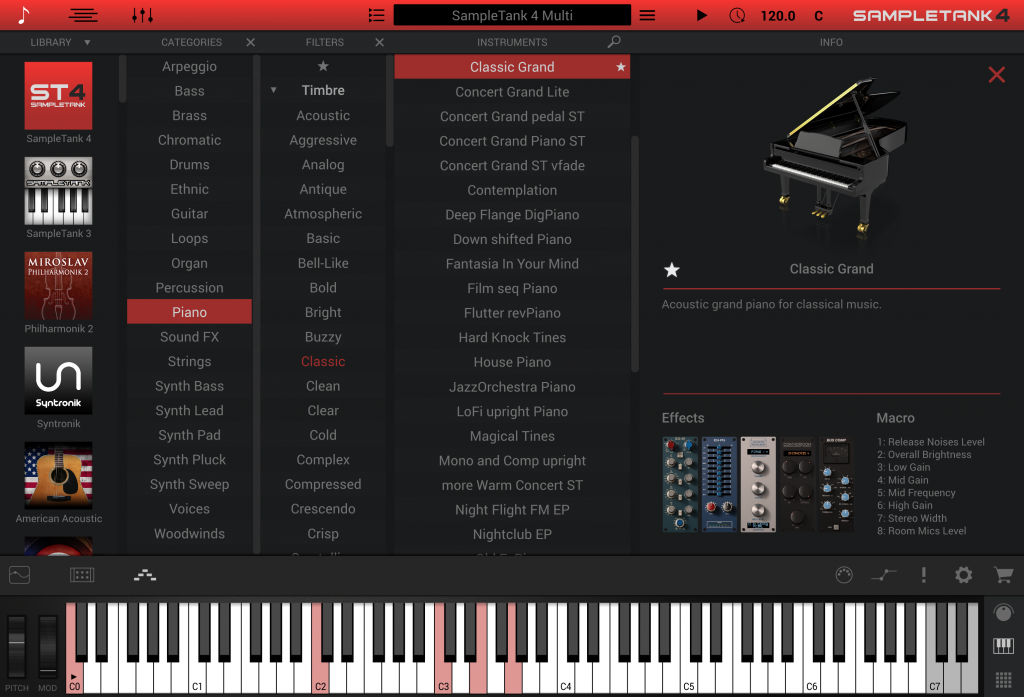
So let’s go back a few years to 2001. We were at the very beginnings of virtual instrument technology as we were discovering the creative possibilities of creating musical arrangements using only our computers. This was when IK Multimedia introduced the first of its kind Multi-timbrel virtual workstation plugin.
You can see in the video above SampleTank version 2 in all of its glory. To have multiple instruments available to you while only using one plugin was a massive boost to workflow and productivity. It was also increased overall performance as you were only using one instance of the plugin.
It is hard to believe how far we have come since then as IK Multimedia continued to refine subsequent updates with SampleTank 3 and now what I consider the ultimate update with the introduction of SampleTank 4!
SampleTank 4 is available in AAX, VST 2, VST 3, and Audio Units plugin formats to ensure compatibility with your audio workstation of choice. There are three versions of SampleTank 4 available: SampleTank 4 SE (Over 30GB of samples and 2000 sounds), Sampletank 4 (over 100 GB of samples and 6,000 sounds)and SampleTank 4 MAX (over 250 GB of Samples and 8,000 sounds). This review will focus on SampleTank 4 MAX.
In order to install SampleTank 4, you need to download the installation program and sound files from your IK Multimedia User Area. Make sure you set aside plenty of time to download and install the content, especially for the larger sound libraries as they are quite substantial.
With over 250 Gb of sound content, SampleTank 4 MAX brings us the largest selection of instruments available in the history of SampleTank. Not only do you have a majority of past SampleTank sound content but gigabytes of freshly sampled instrument content included (which varies depending on the version you select).
Take a look at a quick SampleTank 4 intro video:
Right away you will notice the new user interface. Taking suggestions from users over the years, IK Multimedia answers the call with a very detailed view. The interface is also resizable to accommodate various display configurations helping it to fit in perfectly with your current workflow.
On the main screen, you have the preset browser. The browser provides many ways to search and sort through the vast amount of sound content. You are presented with thoughtful categories where you can apply various filters and indicate your favorites for quick access later on. As you can imagine dealing with a sound library of this size these are welcome features allowing you to find the sounds you are looking for very quickly.
The beauty is having so many different sounds available to you in only one instrument plugin and SampleTank 4 provides you with up to 16 instrument slots. You have control of MIDI channel, split points, and layering of sounds as well as the mix and blend of the currently loaded instruments. You can also save these setups for fast recall later on.
When listening to some of the new sound content I was impressed right away. One instrument that stands out is the newly sampled Yamaha C7 grand piano. The C7 is an iconic staple of the studio many arrangers and producers go-to for that one of a kind sound.
IK Multimedia has taken their time to sample the C7 in such various ways to give you so much flexibility when using it in your arrangements. Providing various mic positions and even binaural stereo recordings lets you cover practically every situation where a piano is needed from rock, jazz, classical and beyond.
Along with the beautiful C7 IK Multimedia meticulously sampled many classic acoustic and electric guitars. These have such a presence and warmth that I really appreciate when playing through them. The way they were recorded inspires creativity and exploration. The guitars also sit well in a mixing situation. The acoustic guitar presets to me have heart and the electric guitars just have that extra edge you need to pull your arrangements together.
The new guitar presets feature different mic positions that you can mix and blend using SampleTank’s macro controls to get just the right tone you are looking for. Playing styles feature up and down strokes to provide an extra level of realism.
There is no way we can adequately cover each and every instrument group here but let me just say that with all of the instruments, IK Multimedia went the extra mile to ensure that the sounds would tend to be the ones you go to when arranging and producing.
Deep inside SampleTank 4 is a newly designed playback engine that in my opinion make the sounds really come to life. SampleTank 4 also imports SampleTank libraries you might have previously installed.
While previewing presets the improvements were very evident. I was so impressed with the Miroslav Philharmonik 2 sounds that had been imported. They sounded new again like I was hearing them for the first time. ST4 MAX includes a selection from Miroslav Philharmonik 2 that you definitely want to check out.

IK Multimedia is a leader in amazing audio effects plugins starting back with their T-Racks mastering suite. SampleTank 4 reaps the benefits of IK’s wealth in the effects department by including 70 audio effects. You have access to various EQs, delays, reverbs, compressors, and more. These effects take what are already great sounding samples into brave new territory as well as allowing you the control to tailor the sounds to fit your specific project you are working on.

I love the tape delays and EQs. There are also some gorgeous sounding reverbs taken directly from T-Racks that emulate some of the most recognized reverbs in the industry. You also have various convolution effects that help simulate real-world spaces and allow you to get some very interesting effects. One interesting effect is the Piano Lid simulator that allows you to adjust the lid position when working with piano patches. Having all of these fun effects gives you endless creative options because who says you have to use piano effects on a piano?
With SampleTank4 you are not just limited to the included presets. You are given powerful editing tools to get under the hood to shape and customize the sounds to your heart’s content and then save the result.
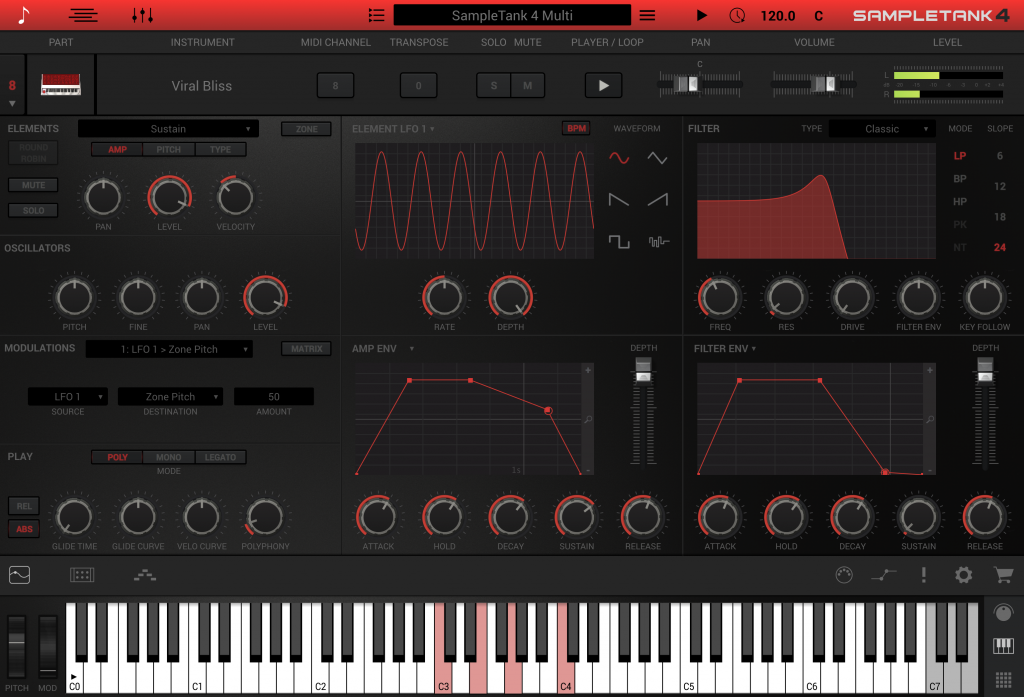
SampleTank 4 includes an ingenious ARPEGIATOR, giving you unprecedented performance possibilities but that’s not all as SampleTank 4 also includes a very innovative STRUMMER/PLAYER module.

As keyboardists, we sometimes forget that other instruments are not played in the same way as our beloved black and white keys. Guitars and similar stringed instruments employ different hand positions and voicings that if not executed properly can make the difference in creating a convincing performance. You also have the ability to create your own player presets.
SampleTank 4 is not only useful in recording and production but also in LIVE performance. The ability to use only one plugin to access multiple sounds and layers is one of the greatest assets.

SampleTank 4 includes a standalone version so you can load it up on your machine of choice to cover just about every situation.
Since its release, IK Multimedia has updated SampleTank 4 several times to bring new features, performance enhancements, bug fixes, and new sounds. At the time of this review the current version is 4.05.
If you are looking for a workstation solution in only one plugin then SampleTank 4 is a great choice. It gives you everything you need to start playing and producing right out of the box.
To show you how easy it is to get started I put a little “Jam Session” together using only SampleTank 4. Enjoy!

I am a true child of the 80s’; when 64k of RAM in a personal computer was groundbreaking and the thoughts of listening to music on something other than a cassette tape was something only George Jetson could imagine. My first experience with digital music composing was a Commodore 64 running Music Construction set but dramatic changes were coming. A digital music renaissance was on the horizon that heralded new discoveries in digital sampling that would change the music world as we knew it forever.

It was around 1986 when I first heard “Instrument of Praise”, a project just released at the time by Phil Driscoll. Driscoll is a well renowned Christian trumpeter, musician, and vocalist who previously performed with Blood, Sweat and Tears, Joe Cocker, and others. It was an incredible experience listening to these powerful orchestrations.  It was even more amazing to discover that all of the arrangements were produced and recorded using only one instrument (aside from Phil’s trumpet) – the Kurzweil 250. As a young Christian musician, it was one of those moments that reinforced my desire to continue my journey into digital music.
Joe Ierardi was behind the original piano sounds developed for the Kurzweil 250 (one weighing in at 1 megabyte which was huge at the time). Years later Ierardi was joined by George Taylor who together formed the company we know today as Synthogy. What began over 30 years ago has brought us Synthogy’s Ivory family of instruments, featuring some of the most beautiful and accurate sampled piano libraries available today.
The original Ivory was groundbreaking in its own right; now with the release of Ivory II Grand Pianos featuring an updated 2.5 playback engine, Synthogy brings newly refined piano samples along with many other user-requested improvements.
The new 2.5 engine brings full 64bit compatibility to the popular plugin formats (VST, AAX, AUDIO UNITS, and RTAS). You also have a very useful standalone for Mac OS and the Windows version features a special version Cantabile hosting a custom Ivory II 2.5 playback engine for live performance.

A look at the Main Screen from Ivory II 2.5 Grand Pianos
The total size of Ivory II Grand Pianos comes in at over 77 gigabytes. Synthogy has provided a well thought out download and installation process. One helpful feature is that you can install one, two or all three piano libraries depending on your particular need. This is convenient if you are limited by available storage space.
Synthogy uses the iLOK protocol for authorizing their products. You can authorize using an iLOK USB dongle (sold separately) or directly to the host computer. With the 2.5 engine update, you are provided with TWO authorizations in case you have a production setup as well as a live performance rig.

It almost feels like a scene from the movie TRON where instead of Bruce Boxleitner, a piano gets sucked into your computer…well almost. Synthogy gives you a clean, intuitive interface along with access to a generous array of elements to help you produce an authentic acoustic piano sound.
This does not stop with 88 keys (a few more if you are playing the Bösendorfer) but provides settings for lid positioning, pedals (even half-pedaling), tuning and adjustments of the non-musical noises (pedals, action, etc.) that further enhance the overall playing experience.
Ivory II Grand Pianos builds on the original Ivory concept, presenting us with three beautiful pianos:
Bösendorfer 290 Imperial Grand
Steinway D Concert Grand
Yamaha C7 Grand
In my first experiences with digital pianos, remembering one time, in particular, I found myself unconsciously playing harder and harder trying to get the digital piano to respond. I played so hard at times, I broke a blood vessel in my finger (OUCH!). What I was encountering is the limitation of not having the appropriate number of layers available. This would have allowed me to play at different velocities as you would on a “real world” piano; the element missing was dynamics.
The first generation sampled pianos were at times limited to only ONE sample layer; employing filtering (either amplitude or frequency) to give the impression the sound was changing the harder or softer you played. With Ivory II Grand Pianos, you have up to 18 sample layers and the American Concert D features up to 20 sample layers.

Here is Ivory II’s preset browser screen. you will notice that the number of sample layers is mentioned in some of the presets.
Not only do you have up to 18 note layers, but also a SOFT PEDAL sample layer and last but not least a layer of RELEASE samples. Some piano libraries in my experience do not include release samples, but believe me they make a huge difference.
All of these layers are great but they would not pack the realism and performance if not for the Ivory playback engine. The updated Ivory 2.5 engine further improves how the many sample layers are accessed in response to how you play; this is vital in providing the transparent and natural playing experience Ivory is famously known for.
Your fingers will definitely thank you because you can’t play what isn’t there; fortunately, Ivory II Grand Pianos gives you that and so much more.
With the updated Ivory II 2.5 playback engine, Synthogy has increased performance and playability by leveraging their years of experience in the area of DSP (Digital Signal Processing) to do most of the heavy lifting. Using DSP reduces dependence on the possibility of having to add additional sample layers and/or other techniques that could place an unnecessary load on your computer system. This is especially apparent when looking at how the Ivory II 2.5 engine approaches sympathetic resonance.
Have you ever asked why some enjoy singing in the shower so much; well it might have something to do with Sympathetic Resonance. What you experience is that a bathroom typically has lots of hard surfaces (glass, tile, etc.) with the sound bouncing around resulting in some notes standing out more than others. I love discovering the resonating frequency of some rooms I’m in (strange looks notwithstanding). This is the idea behind the Ivory 2.5 engine when emulating a piano’s sympathetic resonance response.
Sympathetic resonance is the sound unplayed notes produce as the strings are excited by the notes that are being played. The harmonics and overtones created add sonic realism, character, and are key to reproducing an authentic acoustic piano library.
In the image below you can see some of the options to shape this sympathetic resonance response. Ivory II 2.5 gives you detailed control, going as far as selecting the type of soundboard being used.
Notice the various settings that help to shape the tone and character of Ivory II Grand Pianos
Notice the settings available to you that help to shape the tone and character of Ivory II Grand Pianos, e.g, Shimmer (which affects how the high frequencies are handled), along with a very thought out Equalizer section.
The Ivory II 2.5 engine features very nice effects and ambiance settings, letting you place Ivory II Grand Pianos in some very nice spaces ranging from concert halls, intimate recital rooms, and spaces suitable for recreating some very cool Jazz atmospheres. A Chorus section gives you some interesting and creative possibilities. You also have an additional EQ section featuring an adjustable Low and High shelf along with a band of parametric EQ.

In my experience I have found there is not a one size fits all piano library. If you produce in various musical styles you may encounter times when a Yamaha C7 is just too bright or the Steinway might be just a little too dark and other times a Bösendorfer is just what the doctor ordered. Each has its own unique audible and physical fingerprint.
That being said however you could potentially shape any of these pianos to fit your situation if need be due to the vast amount of control you have over the range of sound, whether it is adjusting the EQ or using their creative Timbre Shifting options. You could go down the rabbit hole pretty quickly experimenting with all of the options Synthogy has provided.
Looking at the SESSION screen above you have options to fit Ivory II into your particular setup. This ranges from MIDI channel assignments to the number of voices and memory allocated for Ivory’s samples. This helps to fine-tune Ivory II for the best possible performance in your specific computing environment.

The Ivory II Session Screen.
You can adjust tuning and velocity scaling to tailor Ivory II to your playing style. The Ivory 2.5 engine also gives you an exciting option for Half Pedaling. This is useful if you use a sustain/hold pedal that can transmit continuous controller messages. This gives you all of those interesting “in-between” tones that are possible when playing a physical piano.
The IvoryII 2.5 engine allows you to create your own Session presets for later recall. This comes in handy when you are playing Ivory II Grand Pianos using a different computer system, different MIDI keyboard controllers or other variable performance situations you might find yourself in.
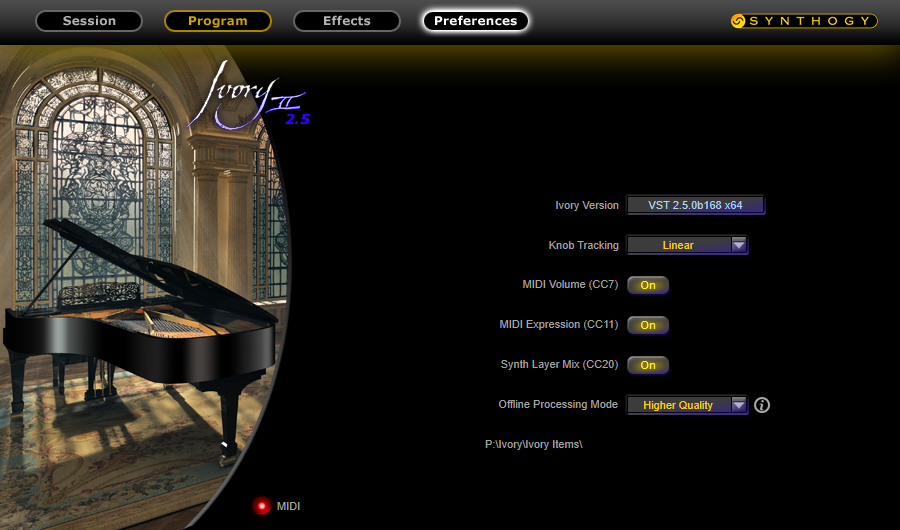
Here you can modify some of the MIDI Control Change assignments
The first version of Ivory featured a special set of sounds you could layer with the main piano presets. These “pad” layers have been further expanded in the latest Ivory II 2.5 engine. The pad layer samples have been taken from synths and vintage string machines to add an extra dimension to the already wonderful sounds of Ivory II Grand Pianos.

A look at some of the pad layers available in Ivory II
Some of the presets bring back memories of some iconic sound textures of the past while others help inspire new directions Ivory II can take you.
I was also able to spend some time playing the Ivory II American Concert D. There are subtle but dramatic differences in the Steinway German D (included in Ivory II pianos) and the American Concert D (available separately). This piano library brings yet another dimension and character unique to the piano that was originally sampled. I experienced an openness and playability that is enhanced by the additional sample layers. I found myself getting lost in this particular instrument as once again the Ivory II 2.5 engine allows for very expressive and detailed dynamics.
Even with state of the art software and tech behind you what really matters at the end of the day is SOUND and in a word what I have experienced with Ivory II Grand Pianos and American Concert D is AMAZING. Synthogy have faithfully transfused the signature and character of the individual pianos into your computer, placing them beneath your fingers.
In my short time working with Ivory II Grand Pianos and American Concert D, I have discovered why many of my friends, clients, and fellow musicians have been so impressed with Ivory and now Ivory II. The years of dedication and hard work that has been put into this series of instruments is heard and experienced in every note that is played.
With the updates to the Ivory 2.5 playback engine, I can say with confidence that Ivory II Grand Pianos and the additional pianos in the Ivory family have solidified their place on future recording projects, movies, commercials, and in live performance. It is no wonder that the Ivory family of piano libraries has been the choice of a vast array of artists and producers who depend on its stable playability in the studio and on tour.
I so appreciate Synthogy and ILIO for giving me the opportunity to discover the beauty of Ivory II Grand Pianos and the American Concert D for myself and to share my experience with you.
For more information and to purchase Ivory II please visit Synthogy and ILIO here:
Synthogy – The Home of the Ivory family of virtual piano libraries
ILIO – Software sales and Distribution
The BBC has published a very interesting video featuring Joe Ierardi (founder of Synthogy); you can view it here: The quest to perfect digital pianos



If this were a bedtime story, it would be similar to Goldilocks finding herself lost in the woods. In this version, however, Goldilocks is a keyboard artist lost in her local music store.
Lost and surrounded by so many confusing and overwhelming selections, what will she do? Suddenly she sees a display in the distance with the large letters “I K”, could she be saved at last? Let’s find out.
Being a musician is not quite a fairy-tale. We are put in similar situations where we feel lost trying to find a solution for a specific problem, in this case finding the right keyboard controller.
At times it’s not possible to travel with a full size 88 note weighted keyboard, even 61 notes could still be too large. On the other end of the spectrum, smaller 25 note controllers might be too small for your particular application. This is where the iRig Keys I/O 49 from IK Multimedia comes in and “spoiler alert”, it might be “just right“.
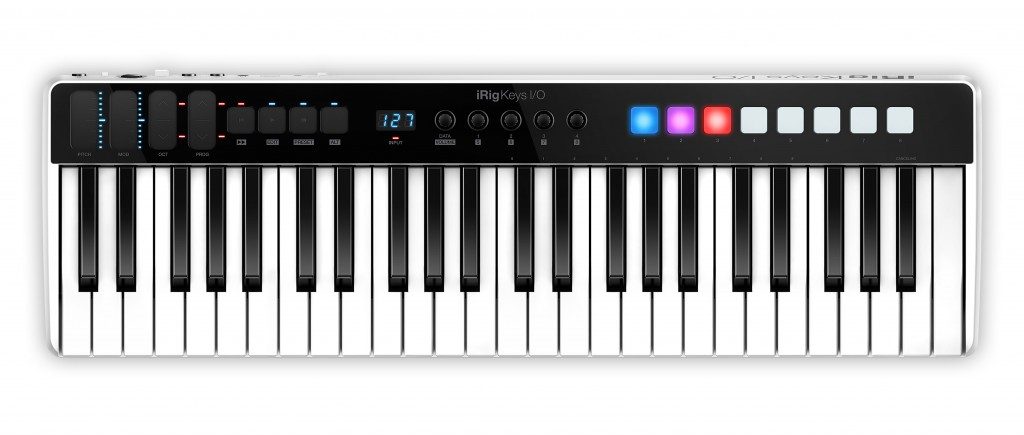
At first glance the iRig Keys 49 is deceptively small. It features a full-sized keyboard but in a very sleek form factor. The IK Multimedia designers really made the most of the space and struck a wonderful balance in proportioning the keys with the rest of the enclosure. 88 keys would have been too many and in my case, 25 keys were not enough so 49 seems to be “just right”.
The keys are the full length and width you would expect in a much larger keyboard. I find many of the smaller keyboard controllers feel mushy and light but the iRig Keys I/O 49 had enough resistance while being very responsive. I have an inside joke that it could keep up with Jordan Rudess very nicely.
Another significant reason I am loving the number 49 is that unlike smaller keyboards, I feel comfortable playing using “both” hands. This makes it a gamechanger for me as far as the usability in certain situations. My hands naturally fall where they are supposed to be without a feeling of being limited. Of course, I am not going to be doing anything too fancy but who knows what inspiration might strike?

The iRig Keys I/O 49 takes a novel approach in the type of controls provided. Departing from traditional “physical” wheels and levers, they have presented the user with “touch-sensitive” controls which by default are set for Pitch Bend and Modulation.
Next, you have a touch control for shifting the keyboard octave (up or down) and lastly a touch control to cycle through program changes (up or down).
One way to use the touch style of controller is to approach it like a very small “ribbon” controller. This allows you to just “tap” (as well as slide) an area on the touch strip to send a control value. It is great for “hammer-on” type of effects when using the pitch control. This can also serve as a sort of rocker switch emulation when using the modulation strip (ie. enabling a fast/slow speed on a virtual tonewheel organ).
I think the reasoning behind going with touch-sensitive controls instead of physical ones might be that they would more roadworthy and less likely to fail.
Moving on you have a nice transport section that can be used to control functions in your DAW of choice as well as control some virtual instrument workstations starting and stopping loop and arpeggiators, etc.. You also have buttons for editing and entering different modes for the controls.
Next, you have the main display which provides information regarding the status of presets and rotary controls when setting up and using the iRig Keys I/O. The small LED indicator below the main display serves as an input meter of sorts when you have an external audio source connected to the iRig Keys I/O; did I just say “audio”?

So this far we have a very capable and portable keyboard MIDI controller but if you look a little closer you will be surprised to see a Mic/Instrument combo jack on the back panel. Yes, that’s right the iRig Keys I/O also includes an AUDIO interface. This is ample enough for most purposes which could include using a vocal mic or plugging in your guitar or other audio sources. In fact, one of the accessories IK Multimedia offers is an ingenious “gooseneck” microphone that integrates right into the XLR connector.

The iRig Keys I/O provide 4 dedicated rotary controls you can use to control various MIDI parameters. Out of the box they are pre-mapped to the Macro controls in SampleTank and Miroslav Philharmonik 2 for instance.

So you have keys, touch sliders, rotary controls, and last but not least PADS. The iRig Keys I/O provide 8 velocity-sensitive RGB (multicolor) pads that respond to velocity with the pads color indicating the relative velocity value. Out of the box they are mapped to comply with most drum layouts.

You have the ability to adjust the velocity sensitivity scaling to adapt to your particular style of playing. Being a finger drummer myself I find the pads to be a nice addition as it helps you to think a little differently when triggering drums. You can also customize the pads channel, note, and controller assignments to give an added layer of flexibility.
I am amazed at how engineers and developers come up with these amazing tools. Bringing a balance in features and keeping things as streamlined as possible can be challenging to say the least. How could they give us even more control; it is through the power of “ALT”.
As you can see in the images above there is additional “reversed” text below the main control labels, these are the functions accessed when engaging the ALT control. Four rotary controls become eight, transport controls are doubled in functionality. This is a simple way to provide more with less.
You will also notice numbers above some of the keys in the upper range of the keyboard. These serve as data entry keys to enter values for certain parameter functions and program changes. Once again instead of adding more overhead by adding a numeric keypad they leverage what we already have available.
Just like our fingerprints, we sometimes require different setups to meet specific performance situations. iRig Keys I/O gives you the flexibility to make that happen.
Starting with 5 factory presets (pre-configured for GarageBand, Logic, MainStage, Ableton Live) the iRig Keys I/O give you an additional 99 presets. You can customize the rotary controls, pad, touch sliders and the pedal input (sustain, switch or pedal (expression/volume).
Another feature of the iRig Keys I/O series of controllers is the ability to use it with Windows, Mac and even iOS (iPads and iPhones) platforms. This is done by the special connector on the iRig Keys I/O which by using one of the included cables can connect the keyboard to USB/A (Windows/Mac) or the Lightning connector found on iPads and iPhones.
IK Multimedia has provided a great package of applications to get you started or to add to your existing roundup of music applications.
If you are using an iPhone or iPad you have licenses for SampleTank, Miroslav Philharmonik 2 (with over 2gb of content), and a sampling of a couple of Syntronik Pro-V (Prophet-5 and Prophet-10). For Mac and PC users, they include SampleTank 3, Miroslav Philharmonik 2 CE, T-RackS Deluxe and Ableton® Live 10 Lite™
Being a fully certified Apple MFi keyboard controller (“Made for iPod, iPhone, iPad,”) you can be assured of a complete plug and play experience.
There is a power adapter available that not only powers the iRig Keys but also provides power to and charges you iPad or iPhone. iRig Keys I/O can even be powered by 4xAA batteries when you really have to rough it. You can then pack everything into the iRig Keys I/O carrying case that is available and off you go.
If you are using an iPad or iPhone there is an included stand. The only drawback is that you must remove your device in order to use it. IK Multimedia offers additional options if necessary.

In the time I have been using the iRig Keys I/O 49 I just keep saying over and over, “it’s just right”. The size, feel and features give me the confidence to use it as a main keyboard when a larger 61 or 88 key controller just is too big.
You can bring the iRig Keys I/O 49, your iPad (or iPhone), connect them to another one of my favorite products from IK Multimedia; the iLoud portable speaker, and you would be looking at a very capable performance setup.
So out of the woods, we go, with our new setup in tow, to bring joyous sounds to listeners everywhere whether high or low ( I just could not help myself). And the last I heard everyone lived happily ever after.
IK Multimedia also produces a 25 note version of the iRig Keys I/O as well as many other MIDI controller and audio interface solutions. Find out which one may be “just right” for you by visiting IK Multimedia’s website or better yet try and find them at your local music retailer to experience them first hand.
Here is a recent video showing my first experiences with the iRIG Keys IO 49:

So you have a brand new computer, a keyboard controller, microphones, sample libraries and some nice monitor speakers; but what is missing?; an audio interface. We sometimes take audio interfaces for granted, but that is a big mistake. Everything coming in and out of your computer DAW has to pass through that same somewhat forgotten interface, that is why it is so important to select the right one.
PreSonus has been manufacturing some of the best sounding and user friendly audio interfaces and mixers in recent years. Their latest release introduces a new set of powerful interfaces that will become the cornerstone of your music production setup.
Following a tradition of roadworthy build quality you will notice how solid (and I mean solid) the Studio 6|8 is. The clear color scheme and controls are a very welcome feature.

Looking closely you will see MIC/LINE/INSTRUMENT combo jacks for inputs 1 and 2. Plug in a mic and you engage the top quality XMAX preamps. You can also connect a guitar and would be good to go not needing to go through a direct box first. Line level sources are not a problem either, you just engage the Line selector and off you go. 48v Phantom power is also controlled by a front panel selector.
Dominating the center of the Studio 6|8 are very attention getting INPUT and OUTPUT LED meters. These are so great for allowing you to get a visual representation of your signals going in and out of the interface helping you to maintain optimal levels.
The two buttons on the other side of the meters focus on monitoring. The A/B button switches the headphone output between outputs 1-2 and 3-4. This is great for comparing how the different mixes sound. The last of the front panel buttons MON allows you to listen to the LIVE input mixed in with the audio coming from the computer. This is a convenient way to monitor track playback from your DAW while adding new parts.
Moving on you have your INPUT LEVEL adjustments (inputs 1 – 4) along with MAIN and HEADPHONE output level controls. All of the controls like the rest of the build feel very solid. Even though most of the time the Studio 6|8 will be sitting comfortably in your studio, it’s good to know if can also handle a road trip or two. PreSonus has really given us a lot of flexibility and very thoughtful touches along the way.
Around the back of the Studio 6|8 you will find a lot of goodies. I am very impressed with all of the ins and outs the Studio 6|8 provide and it sets this particular interface in a certain sweet spot for me as far as the overall utility.

So from left to right you have the power supply input. The power supply is a “lump” in the line type which is somewhat better than a strict “wall wart”. The power is needed to feed the hunger of the wonderful on-board mic preamps. Next you have the power switch above a 9 pin DIN connector that connects to a breakout cable hosting MIDI In and Out as well as SPDF In and Out.
Of course you have to have a way of connecting to your host computer and that comes in the form of a USB 2.0 B type connector. On down the line you have LINE OUTPUTS 3/4, MAIN OUTPUTS 1/2, COMBO MIC/LINE INPUTS 3/4 and last but certainly not least your faithful HEADPHONE jack.
PreSonus has taken the same amount of care on what’s inside as the outside. The digital converters boast a very nice 114db dynamic range. You are not just given 2 but 4 (yes 4) of their XMAX Class A mic preamps which will give you amazing results when they meet your studio’s microphone cabinet. This is all being pushed to and from through a very high performing USB 2.0 interface.
Well while all of this has sounds pretty great on paper, where it really counts is taking the Studio 6|8 out of the box and see what this baby can do.
The primary function of an interface like the Studio 6|8 is serve as sort of the audio hub if you will of your production studio. I have been going through shifting things around in my production room but no matter how you configure it the Studio 6|8 fits right in and can adapt to your individual situation.

You can see I have it sitting on the top of my CPU tower. Having it there was convenient to make all of my connections and still have easy access to the controls. You can see I am using a Studiologic SL-880 controller and Cakewalk SONAR Platinum as my DAW currently (an entirely different story to be told). You will also see my trusty Roland XP-50 to the left.
If this is your first experience with an audio interface the Studio 6|8 includes STUDIO ONE ARTIST and a very generous supply of plugins to get you started. PreSonus’ flagship DAW Studio ONE has continued to improve and innovate and has become the DAW of choice for many and an upgrade path is available for users of Studio One Artist.
My typical workflow is to work mostly in the box and working with software instruments audio latency and stability is most critical. My current CPU is a 3.4ghz Intel i5 Quad Core with 32 gb of RAM. Using the PreSonus Universal Control application to talk to the interface I have had some instances where I pushed the audio buffers below 10ms and things still seemed to run smoothly. Having that performance in a USB 2.0 interface is very amazing. It tells me that PreSonus has been really working to ensure stable and low latency performance in the area of their hardware drivers.
I have recently been doing some live television work with a worship team and band and wanted to keep things as simple as possible. This time I wanted to use my 2013 MacBook Pro 13″ Retina and see how that would go.

With this setup I am using MainStage running Omnisphere, Pianoteq, HALionSonic 3 and Kontakt (yeah I know I am a glutton for punishment). Another thing I did was while using the Yamaha Motif as my controller I also wanted to leverage its sound as well. I took the stereo outputs of the MOTIF and plugged them in to rear inputs 3 and 4. I then assigned those inputs to a channel strip on MainStage so I could control the blend of the instruments from there, almost like a monster layer.
The Studio 6|8 sounded so good. The overall sound is so clean and quiet. Having the front panel LED Meters was a big help as it allowed me to monitor the input from the MOTIF as well as the output signal I was sending to the control room. Overall a big win!
I had recently purchased a pair of IK Multimedia’s iLoud Micro Monitors (which are scary amazing, more info here) and was trying to figure out how to incorporate those into my setup.
For the life of me the name itself STUDIO 6|8 had me puzzled until I had an interesting idea on how to utilize the S/PDIF outputs. I had a surprise in what I discovered. For around $12 on Amazon you can pick up a very small Digital to Analog converter box.

PROZOR Digital to Analog Converter DAC Digital SPDIF Toslink to Analog Stereo Audio L/R Converter Adapter
The S/PDIF output of the Studio 6|8 worked great with this and allowed me to connect my iLoud Micro Monitors without any hassle whatsoever and the sound and performance were excellent. I am wondering if there is another magic box that will let me go analog to digital? Now your mileage may vary but it is fun to try things. The connections can also be used to capture audio to and from other devices supporting S/PDIF including your computer, DVD/CD or even another Studio 6|8.
Well after using the Studio 6|8 for a few months I can say without reservation that PreSonus continues to raise the bar starting from the rock solid, road worthy build all the way through to the high performing audio features. Plenty of inputs and outputs allow it to fit into the a wide range of potential setups and to top it off the $299 price point sort of takes you by surprise as you would expect to pay more for this much quality and utility.
After using one of PreSonus’ AudioBox USB VSL22 interfaces (which is also a great box) I think I have to say I will not be sending the Studio 6|8 back to PreSonus (they have my credit card info).
If you are on the fence about what interface to purchase for a first time user or you are replacing an older interface, my feeling is that you could not go wrong in choosing the Studio 6|8. There are also a few other models on the other sides of the Studio 6|8 from the Studio 2|6 all the way up to the 18 input/output Studio 18|24.
No matter which one you choose you will be sure that the years of quality innovation, attention to detail and a reputation of meeting and supporting the needs of their customers will confirm you made the right decision.
Respect? Yes respect and lots of it for the PreSonus Studio 6|8.
The Studio 6|8 is available now from your music retailer of choice and lists for $299. More information can be found by visiting the official Studio 6|8 page on the PreSonus website.